


To control smart door locks with Alexa, first link the lock to the Alexa app and verify it’s connected to Wi-Fi. Enable the smart lock’s skill in the app and create a secure four-digit PIN for voice commands. You can use phrases like “Alexa, lock my front door,” or “Alexa, open my front door,” if you’ve set it up right. Monitoring lock activity helps keep your home secure. There’s much more to explore, including troubleshooting tips to enhance your experience.
Key Takeaways
- Download the Alexa app and ensure your smart lock is connected to Wi-Fi for compatibility.
- Enable the specific smart lock skill in the Alexa app under “Skills & Games.”
- Create a secure four-digit PIN for voice commands and configure settings as needed in the Tapo app.
- Use voice commands like “Alexa, lock my front door” to manage your lock conveniently.
- Monitor lock activity through the Device History feature to track locking and unlocking times.
Linking Your Smart Door Lock to Alexa
Linking a smart door lock to Alexa can greatly enhance home security and convenience, especially when the setup is straightforward. To begin, users need to download the Alexa app on their mobile devices, ensuring their smart lock is connected to Wi-Fi. In the app, they can enable the specific skill for their smart lock by searching under “Skills & Games” and following the prompts to link the accounts. For users with a Ring Alarm System, the smart lock must be added to the Ring app first. Once linked, voice commands like “Alexa, lock my front door” provide effortless control. It’s essential to check that the open feature is enabled in the Alexa app settings for ease of access. Many smart locks include AES-128 encryption for added security, ensuring that your home remains protected at all times.
Recommended Products
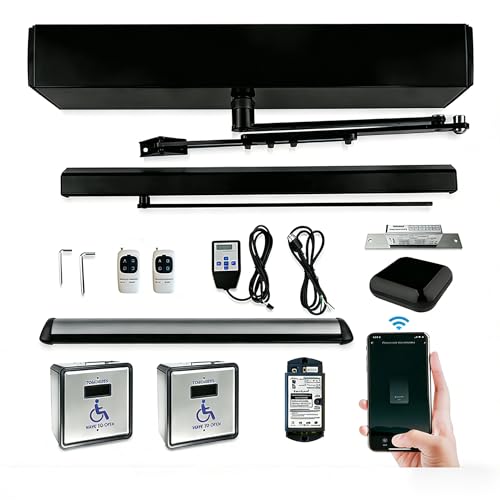
WORKS WITH ALEXA&GOOGLE ASSISTANCE,SIRI,PHONE APP:The smart wifi automatic door opener comes with WifI controller,compatible with Siri,Phone App,Alexa and Google Assistance,Remotely control ada commercial auto door closer easily;Please pair codes between wireless fob keys and smart wifi controller

With wireless touchless hand wave sensor switch,wave to open the door,non-touch,safer for users,High waterproof IP class IP65 handicap sensor switch,avilable for automatic touchless door opener

SAFE-The low energy ADA handicap door opener is equipped with safety motion scanner,it is with an auto rebound and active protection function, which will enable the door to not close when someone is standing within detection range of safety sensor,safe for people especially the disabled.
Configuring Settings for Voice Control

Configuring settings for voice control can make the experience of using a smart door lock more seamless and user-friendly. To start, users must verify their smart locks are compatible with the Alexa app. Integrate the lock by enabling its specific skill, which is vital for functionality. Once connected, it’s important to create a secure four-digit PIN in the Alexa app, as this PIN is required to access the door with voice commands. Don’t forget to enable the “Unlock by app” and “Enable Unlock” features in the Tapo app for voice activation. For ongoing security, it’s wise to regularly change this PIN in the Alexa app. After any changes to settings, rediscover the device in the Alexa app to implement updates. When integrating outdoor smart devices, ensure they have a weather-resistant design to withstand various environmental factors.
Recommended Products

WITH WIFI RFID SENSOR AND TAGS FOR PETS,DISABLED:The automation door opener comes with smart wifi sensor and wireless tags,which can be wear or tied on pets,wheelchair,pocket,etc,When tags approaching sensor door opener,door open automatically.

[Smart WIFI Handicap Door,Compatible with Alexa,Google Assistant]Handicap door opener can be voice controlled by smart speaker,Remote controlled on Phone App from anywhere

SMART-Smart WIFI Handicap Door,Compatible with Alexa,Google Assistant-Low Energy Auto Handicap door opener can be voice controlled by speaker,Remote controlled on Phone App TUYA from anywhere
Using Voice Commands With Alexa

When it comes to using voice commands with Alexa, homeowners discover a convenient and hands-free way to manage their smart door locks. For locking a door, saying, “Alexa, lock my front door,” quickly engages the lock. Curious if the door is secure? Homeowners can simply ask, “Alexa, is my front door locked?” To open, a PIN is required, followed by the command, “Alexa, open my front door.” The flexibility doesn’t stop there, as users can secure or open multiple locks by specifying lock names in their commands, such as, “Alexa, lock my back door.” Of course, for seamless functionality, ensuring that the smart lock is compatible with Alexa and properly configured is essential. Many Alexa-enabled door locks offer multiple access methods, such as fingerprint recognition and app controls, providing enhanced security and convenience.
Recommended Products

EASY SMART HOME CONTROL FOR EVERYONE: Brilliant touchscreen panels with built-in Alexa make it easy for everyone at home to control popular smart devices, lighting, cameras, locks, thermostats, intercom, scenes and more by simply replacing a light switch.

[Both Manually and Automatically Open Door]Manually push force can be adjusted on closing force by handheld programmer,more easily to manually push open door when it is low closing force

SMART WIFI AUTOMATIC SWING DOOR:Smart WIFI Phone APP control automatic door opener,Compatible with Phone App,Alexa and Google home,voice control automatic front door opener
Monitoring Lock Activity
Monitoring lock activity becomes an essential component of home security, especially for those using smart door locks. Through the Device History feature of the corresponding app, users can track every time their door is locked and opened. This detailed log provides timestamps, allowing homeowners to review the door status and notice any unusual activity that may raise concerns. For example, in shared living spaces, this history can be invaluable for accountability among multiple users, ensuring everyone knows when they accessed the lock. Regularly reviewing lock activity not only validates functionality but also helps identify potential security breaches. Keeping an eye on these records enables users to maintain peace of mind by proactively managing their home security. For further enhanced monitoring, consider utilizing advanced motion detection features available in some smart security systems, which precisely track movement to minimize false alerts.
Troubleshooting Common Issues
Troubleshooting common issues with smart door locks can sometimes feel like solving a mystery, but many challenges are relatively simple to fix. If Alexa fails to lock or open your door lock, first check if it’s connected to Wi-Fi and recognized by the Amazon Alexa app. Make certain to issue voice commands accurately, saying things like “Alexa, lock my front door,” for best results. If your device isn’t responding as expected, try saying “Alexa, discover my devices” to refresh its recognition. Additionally, regularly review the activity logs in your lock’s app to spot any discrepancies. Some smart home devices, like the Echo Dot (5th Gen), offer enhanced smart features that can improve your experience with Alexa. Finally, if your lock requires a PIN to open, confirm it’s configured correctly in the Alexa app to avoid prompts that might confuse users (and anyone else trying to enter!).
Enhancing Your Smart Home Security
Smart home security can significantly benefit from the integration of devices like Alexa and smart door locks. By using simple voice commands such as “Alexa, lock my front door,” homeowners enjoy rapid locking without needing physical contact. For added peace of mind, asking, “Alexa, is my front door locked?” provides reassurance about entry points. Echo devices paired with doorbell cameras allow users to see and talk to visitors, enhancing security further. Custom PIN codes can be created in the Alexa app, ensuring that only authorized individuals gain access to the door. Finally, monitoring locking events through the smart lock’s companion app helps maintain a clear overview of who enters and exits, ultimately strengthening smart home security. Many smart locks offer multiple unlocking options including fingerprint recognition, PIN codes, smartphone apps, and voice commands, thereby enhancing convenience and security.
Frequently Asked Questions
Can Alexa Control Door Locks?
Alexa can control door locks, enhancing smart home convenience. For instance, a user asks, “Alexa, lock the front door,” utilizing voice commands while benefiting from security features like PIN protection and activity monitoring through compatible apps.
How Do You Unlock the Front Door With Alexa?
To access the front door with Alexa, one must enable voice commands through the app, set a secure PIN, and guarantee the smart home integration is complete, as security features prevent unauthorized access.
How Do You Unlock a Lock With Alexa?
Amidst the whispers of modernity, releasing a lock with Alexa requires voice commands woven with security features. Users must set a PIN, enabling smart technology to respond, all while safeguarding against unauthorized access through vigilant measures.
How to Connect Lock to Alexa?
To connect a lock to Alexa, enable the device’s skill in the Alexa app, link accounts for smart home integration, and discover devices for seamless voice command setup, enhancing security features through effortless management and control.


