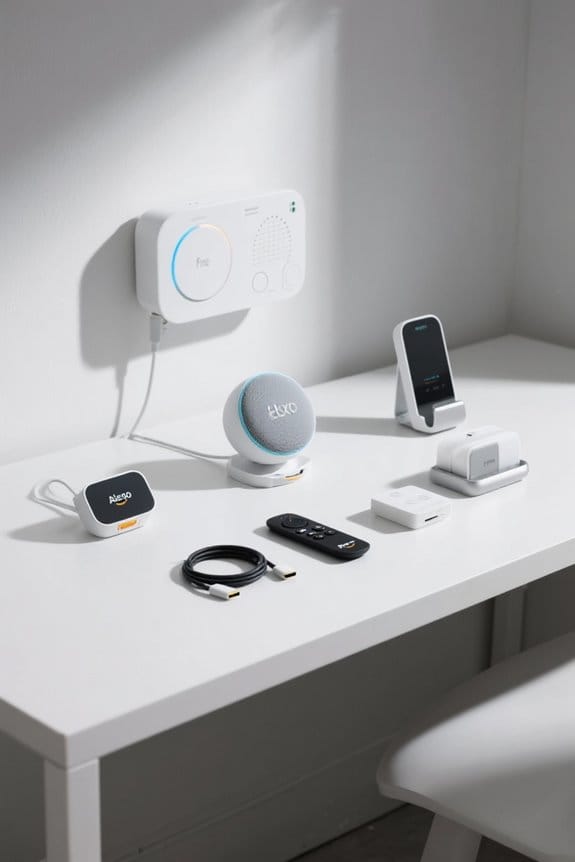
To integrate Fire TV with Google Home devices, start by ensuring both are on the same Wi-Fi network. Download the Google Home app and activate Bluetooth on your Google Home for pairing. While you can use basic commands like play and pause, the integration has its limits compared to Alexa or Chromecast. Fire TV works best with brand-specific devices for smoother control. Stick around to discover more tips about enhancing your streaming experience!
Key Takeaways
- Ensure Fire Stick and Google Home are connected to the same Wi-Fi network for basic functionality.
- Download the Google Home app on your smartphone for managing devices.
- Activate Bluetooth pairing on Google Home to connect with the Fire Stick.
- Limited commands include basic functions like play, pause, and volume adjustments.
- For a better experience, consider using Alexa or Chromecast for more seamless control.
Understanding Fire TV and Google Home Compatibility
When exploring the compatibility between Fire TV and Google Home, it’s important to note that these devices, while popular in many homes, don’t fully recognize each other in their respective apps. The Fire Stick can handle some basic voice commands through Google Home, yet the functionality falls short compared to what Alexa offers. Although both devices support Bluetooth, users will find that this only enables simple audio rerouting instead of full control. For those seeking an optimal streaming setup, reliable power adapters play a crucial role in ensuring uninterrupted performance of your Fire TV Stick. Curiously, for those already embedded in the Google ecosystem, Chromecast provides superior integration, allowing for more seamless command execution. To sum up, while Fire Stick and Google Home are nice devices individually, their compatibility leaves much to be desired for an integrated home viewing experience.
Preparing Your Devices for Integration

Preparing devices for integration is a straightforward yet important step for users excited to enhance their smart home experience. First, users should verify that their Fire Stick is securely connected to the TV and powered on. Next, downloading the Google Home app on a smartphone is vital for managing connected devices. Both the Google Home and Fire Stick must be on the same Wi-Fi network; this facilitates seamless communication between the two devices. To establish basic functionality, users should activate Bluetooth pairing on the Google Home using a voice command or the settings in the Google Home app before connecting to the Fire Stick. Ensuring that the LED Barn Light is properly installed and operational can enhance the overall smart home environment by providing efficient outdoor lighting. These initial steps will set the stage for a smoother integration process down the line.
Setting Up Google Home for Fire TV Control

Once the devices are prepared for integration, the next step involves setting up Google Home to control the Fire TV. First, it is essential that both devices are connected to the same Wi-Fi network for basic functionality. Users can pair Google Home with the Fire Stick using Bluetooth by activating pairing mode, although this limits commands and sound options. Basic voice commands recognized by Google Assistant include play, pause, and volume adjustments, which can provide simple control. However, if a user seeks more advanced streaming capabilities, alternatives like Alexa may offer better integration. For ideal compatibility, switching to Chromecast might enhance the overall experience, delivering superior voice control features with Google Home devices. An effective air purifier can significantly reduce airborne pollutants in your home, improving indoor air quality for a healthier environment.
Recommended Products

APPEARANCE: The Sideline electric fireplace is designed for recessed in-wall mounting. Creating a cozy atmosphere of a traditional fireplace, this electronic fireplace has realistic flames with a real fire look. The Sideline’s 5 flame settings radiate a soft ember glow up to an intense blaze. Sideline gives you the total package. Control the heat and flame with the remote control. Designed to use one log or crystal, if you prefer you can mix both safely.

CUSTOMIZE APPEARANCE: Up to 144 total color combinations for flames and embers, 5 independent brightness levels, and 5 flame burning speeds. Includes interchangeable faux log and crystal ember bed sets for added visual decor.

HDR COMPATIBLE: HDR10 technology (with 4K input) enable brighter whites and deeper black levels. The six-segment color wheel (RYGCWB) produces accurate color with sRGB & REC. 709 color profile support..Power supply : 100 ~ 240V, 50 ~ 60Hz.Batteries Required:no
Linking Fire TV to Google Home
Linking Fire TV to Google Home offers a convenient way to manage streaming through voice commands, but it does come with some limitations. While the Fire Stick can be paired with Google Home via Bluetooth, this setup primarily allows for basic sound rerouting, not extensive streaming control. Users must activate Google Home’s pairing mode through a command or the app. Although some basic commands may work with Google Home, the experience is much richer with Alexa, which provides more intuitive control options. For those seeking a more seamless integration experience, using Chromecast is recommended, as it enhances voice control and expands device capabilities, making streaming smoother and more user-friendly (a bit like upgrading from a flip phone to a smartphone). Additionally, using a Fire Stick Ethernet adapter can significantly improve the stability and quality of your streaming experience by providing a reliable wired connection.
Recommended Products
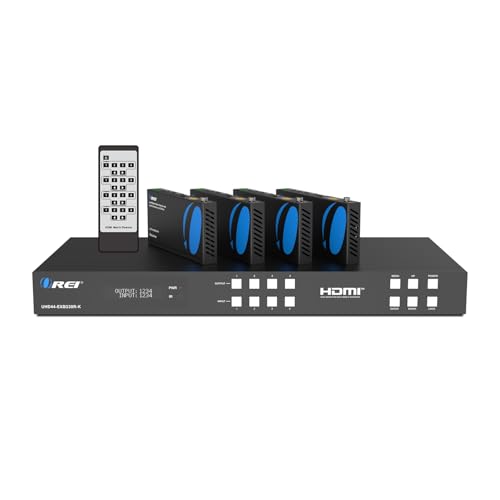
OREI 4 Inputs & 4 Outputs Over CAT6/7 LAN Cable upto 230 Feet. Plus Additional 4 Loop Out HDMI Source at Local Location. Perfect Professional Distribution Product. Ideal for 4K Blu Ray Players, Game Consoles, Media Players, Satellite Receivers, Computers, Laptops and Other Sources. The device comes with a dual voltage supply using a US plug, and an adapter/converter is provided for international use.

HIGH SPEED OPTIC CABLE FOR LARGE INFRASTRUCTURE: This Black 1000 Feet Spool of Plenum Fiber Optic Distribution Cable can be used for both Indoor/Outdoor purposes. It is the right choice for you if you have large installation requirement of short range runs at LAN Speed.

【TV or Mirror or Art】- IP65 waterproof TV decorated with the waterproof Polystyrene frame. It is an elegant mirror when turned off and it presents TV program when turned on, or it can transform into a beautiful work of art when you’re not watching TV. A good lifestyle-oriented TV for any room. It is safe and luxury to mount it in the wall of wet places such as bathroom, or any other indoor areas you like.
Basic Voice Commands for Fire TV via Google Assistant
How can users effectively control their Fire TV with Google Assistant? Users can take advantage of basic voice commands, such as “play [movie/show name]” or “pause,” to manage their viewing experience. While these commands are simple and effective, it’s important to note that Google Assistant does not support more complex streaming tasks. Additionally, when utilizing Bluetooth pairing between Fire Stick and Google Home, users can only access limited functions like basic volume control, which can be a bit frustrating. For a more seamless interaction, it may be wise for users to explore relying on Alexa, which offers broader command options. Alternatively, switching to Chromecast could enhance integration further, providing additional convenience during entertainment sessions. For optimal streaming quality, consider using Ethernet adapters with your Fire TV Stick to ensure a smoother experience.
Limitations of Using Fire TV With Google Home
While many users might expect a seamless integration between Fire TV and Google Home devices, the reality is that significant limitations exist. For starters, the Fire Stick and Google Home do not fully recognize each other in their respective apps, limiting integration options. Users can’t issue voice commands like “stream [show name],” which means accessing content isn’t as smooth as it could be. Although both devices allow Bluetooth pairing, this functionality primarily reroutes sound to Google Home without enriching speaker capabilities. Additionally, while Google Home recognizes some basic commands for Fire TV, it’s worth noting that this integration is not as robust as what Alexa offers. For a more seamless experience, users may want to evaluate Chromecast, which enhances compatibility and performance. Many security systems support smartphone integration for user convenience, allowing for real-time alerts and monitoring from anywhere.
Recommended Products

All-in-One Entertainment with Fire TV Built-in: Watch live TV, use voice controls to easily find your favorites, and even get personalized recommendations.

16 inch 1920*1200 touchscreen supports playback of 4K video files:This protable car tv is equipped with 16inch, 1920*1200 resolution HD touch screen ,supports 4K HD video playback.Make the screen display super clearer and more delicate.16inch headrest monitor for car is compatible with MP4/ MPG/AVI/MKV/MOV/3GP/MP3/MAV/FLAC/AAC/OGG/OGA audio&video formats

【15.6'' HD IPS touch screen】 Car headrest TV It adopts a 15.6-inch IPS touch screen. The screen resolution is 1920*1080, and the display is super clear and delicate.
Alternatives for Controlling Fire TV
When users find that controlling Fire TV with Google Home is not as intuitive as it could be, they often look for alternatives that offer a smoother experience. One popular option is Chromecast, which allows complete voice control via Google Home after setup. This stands in contrast to the limited functionality available with Fire TV, where basic commands may fall short. Some users may prefer Alexa, which automatically pairs with Fire TV, providing superior voice command capabilities and ease of control. Additionally, those managing multiple Fire TVs can easily adjust their connections through the Alexa app settings, ensuring a seamless experience. Ultimately, for Google Home users, considering Chromecast could lead to a more satisfying smart home integration. Many smart switches support voice control through Amazon Alexa and Google Assistant, enabling hands-free operation and enhancing accessibility and convenience.
The Advantage of Alexa With Fire TV
Many users appreciate the significant advantages that Alexa brings to the Fire TV experience, making it a popular choice for smart home integration. The advantage of Alexa with Fire TV lies in its seamless control through voice commands, which allows users to play, pause, or search for content without fumbling for a remote. Setting up Alexa with single Fire TV devices is automatic, simplifying the user experience. In multi-TV households, the Alexa app enables users to manage and link devices easily, creating a unified control experience across all screens. In addition, a wide range of voice commands is available on Amazon’s Alexa page, ensuring hands-free entertainment control that outperforms the limited functionality seen with Google Home. With Alexa speakers like the Amazon Echo Dot, users can enjoy improved audio experiences and enhanced smart home integration, making their entertainment setups more dynamic and versatile.
Integrating Chromecast With Google Home
Integrating Chromecast with Google Home brings a whole new level of convenience to everyday streaming. To start, users should connect their Chromecast device to the TV and guarantee it shares the Wi-Fi network with Google Home. Utilizing the Google Home app, they can easily tap the “+” icon, then select “Set up device,” following the prompts to link them. After this straightforward setup, voice control becomes active, allowing commands like “Play [movie/show name]” directly from Google Home. Unlike the Fire Stick, Chromecast supports a variety of streaming commands, enhancing functionality considerably. Users can also request Google Home to control playback, pause, or switch channels on their Chromecast-enabled TV, all without reaching for a remote (which is a nice touch). Additionally, Chromecast’s integration with Google Home allows users to enjoy an eco-friendly streaming experience by optimizing energy consumption, similar to using rechargeable batteries in electronic devices.
Maximizing Your Streaming Experience
Maximizing the streaming experience goes beyond merely selecting the right device; it involves understanding the various features that enhance enjoyment. Users can integrate their Fire TV with a Google Home device by linking their Google account, allowing for basic control functions. While this integration permits simple tasks, such as adjusting the volume or turning the device on, it lacks the full range of capabilities available with Alexa. Those seeking a more robust experience may find Chromecast a better option, as it offers seamless voice control features. Despite limitations, exploring the foundational integrations can still provide value and elevate the enjoyment of media. The right approach guarantees users get the most from their streaming setup, optimizing their entertainment experience. For users with small to medium setups, the NETGEAR GS305 and other similar devices offer excellent options for reliable Ethernet connections, enhancing the overall performance of streaming devices.
Exploring Brand-Specific Device Benefits
When considering the best streaming setup, the advantages of brand-specific devices become clear. For instance, Fire TV offers an exceptional control experience when paired with Alexa. Users can benefit from seamless voice commands and intuitive options that enhance their viewing. In contrast, Google Home provides only limited control over Fire TV, restricting users to basic commands without advanced features. Meanwhile, devices like Chromecast integrate deeply with Google Home, offering extensive voice control. For those with multiple Fire TVs, using the Alexa app simplifies device management, making it easy to link everything. Ultimately, relying on brand-specific devices maximizes available features and promotes user satisfaction, ensuring a more streamlined and efficient streaming experience (because who doesn’t love efficiency?).
Troubleshooting Common Integration Issues
While attempting to integrate Fire TV with Google Home devices, users may encounter various challenges that can complicate their streaming experience. One notable issue is that Fire Stick and Google Home do not natively recognize each other, limiting voice commands. Pairing the devices via Bluetooth can help, but it may also restrict sound quality for Fire TV. Users often find that Alexa offers better control over Fire TV than Google Home due to its extensive voice command support. For those seeking seamless integration, considering a Chromecast with Google Home could be beneficial, as it provides a smoother experience. Basic commands are possible, but for full functionality, brand-specific solutions, like using Alexa, are highly recommended for best results.
Frequently Asked Questions
Can I Connect My Fire TV to My Google Home?
Connecting Fire TV to Google Home is akin to trying to fit a square peg in a round hole; while basic device compatibility exists, seamless integration remains elusive, limiting advanced functionalities and voice commands between the two devices.
How Do I Connect My TV to My Google Home?
To connect a TV to Google Home, users should guarantee the TV supports Smart Control features. Follow manufacturer instructions for setup, linking the TV to the Google Home app to enable voice control functionality.
Can Google Home Connect to Amazon?
Google Home cannot directly connect to Amazon devices, leading to frustration in smart assistant interaction. Users often seek workarounds, yet find they are limited, leaving them yearning for a more seamless, integrated experience across platforms.
How Do I Sync Devices With Google Home?
To sync devices with Google Home, users should confirm device compatibility, activate Bluetooth pairing through voice command or app, and verify both devices are updated and connected to the same Wi-Fi network for best performance.