


To watch live TV on a Fire TV Stick without cable, users have various options. They can explore skinny bundle streaming services like Sling TV or Hulu + Live TV for affordable live channels. Over-the-air TV is another choice; a digital antenna can capture local broadcasts. Additionally, free apps like NewsOn and LocalNow provide local news at no cost. To enhance the experience, consider using a VPN for privacy and security while streaming. More exciting options await!
Key Takeaways
- Utilize skinny bundle streaming services like YouTube TV and Sling TV for affordable live TV access without cable installation.
- Consider free over-the-air TV using a digital tuner and HD antenna to access local channels without subscription fees.
- Download free apps on the Fire TV Stick, such as NewsOn and LocalNow, for local news and weather coverage.
- Explore premium streaming services like Paramount Plus and Max for live TV, sports, and original programming options.
- Use a VPN for enhanced security, privacy, and access to region-specific content while streaming on the Fire TV Stick.
Skinny Bundle Streaming Services
Many viewers today are turning to skinny bundle streaming services as a savvy alternative to traditional cable. These options, like Sling TV and YouTube TV, provide affordable access to live TV and local channels, all without complicated installation or equipment. The subscription model allows users to choose from customizable plans that adapt to individual viewing habits, often starting at lower monthly costs than cable. Users appreciate the flexibility to watch on a Fire TV Stick, smartphones, or tablets, making it easy to enjoy their favorite shows anywhere. Additionally, many services offer trial periods, so potential subscribers can explore channels before committing. Overall, skinny bundles present a valuable solution for accessing desired content without the hefty price tag of traditional cable. Some eco-conscious viewers are also opting for devices that utilize rechargeable AA batteries, highlighting a growing trend towards sustainable living practices.
Over-the-Air TV

With the rise of streaming services, viewers may overlook a fantastic option for accessing live TV: over-the-air broadcasting. To enjoy over-the-air TV on a Fire TV Stick, a digital tuner like the HD HomeRun or Tablo is essential, paired with an HD antenna for capturing broadcast signals. Positioning the antenna higher or near a window can greatly enhance signal quality, ensuring a better viewing experience. Once set up, users can access local channels such as ABC, CBS, NBC, FOX, and PBS at no extra subscription costs by utilizing compatible streaming apps like Channels or the Tablo app. Some advanced video doorbells offer Color Night Vision, providing good visibility at night and enhancing security. While Fire TV Recast supports this feature now, prospective users should consider its limited support, ending in 2026 (a bit of a bummer!).
Free Apps
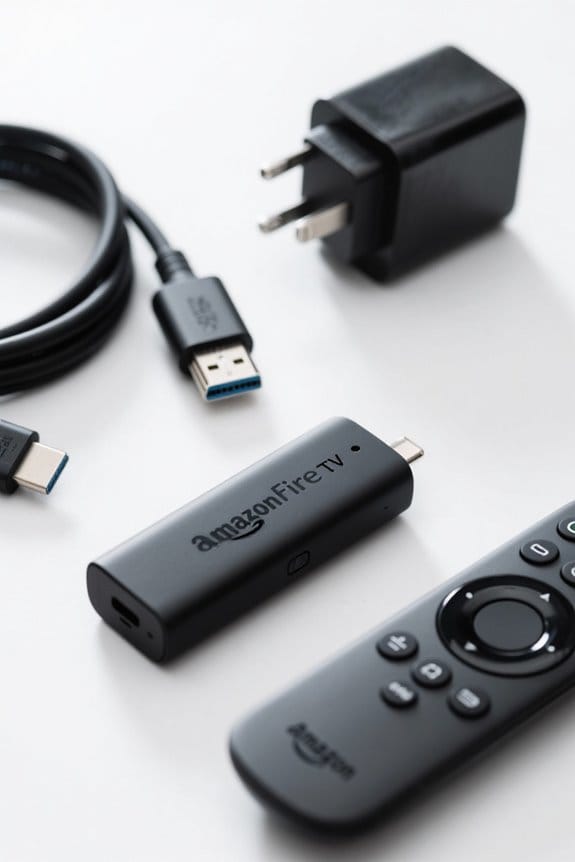
Although many people associate streaming services with entertainment, free apps on the Fire TV Stick offer a fantastic way to access local channels without paying a dime. Apps like Fire TV Channel, NewsOn, and Haystack News provide a wealth of local news coverage, featuring live channels that deliver news from local stations. For those interested in weather updates, FOX Weather and Weather Nation offer continuous forecasts at no cost, making them great options. LocalNow combines news, weather, and entertainment, creating a thorough source for local information. Many advanced video technology features like HDR improve clarity in varying light conditions, enhancing the viewing experience on compatible devices. The availability of these free apps streamlines the process of accessing live TV content, ensuring users can enjoy local channels on their Fire TV Stick without breaking the bank.
Using Free & Official Live TV Apps
Finding reliable live TV options on the Fire TV Stick can be an exciting adventure for users, especially since there are many free and official apps available. To get started, one should navigate to the Live section on the home screen, ensuring the device is connected to WiFi. Accessing Live TV Sources allows users to explore current providers linked to their Fire Stick by selecting Add More Channels. Popular free streaming TV apps include News by Fire TV, Pluto TV, and Local Now, which provide various local channels at no cost. To download an app, users can search manually using the Find option, select the desired source, and click Get to initiate the process. Enjoying free content streaming becomes effortless!
Using Subscription-Based Channels
To enjoy live TV on the Fire TV Stick, users can tap into a variety of subscription-based channels, which offer a flexible and often cost-effective alternative to traditional cable. Popular subscription services like YouTube TV, Sling TV, and Hulu + Live TV provide access to numerous live channels and on-demand content. To access these live channels, users must log in with their subscription account credentials within the app. Once logged in, they can easily navigate to the app’s Live category, where a well-organized TV guide simplifies browsing. By exploring the Live TV Sources option on the home screen, users can discover available providers. Users seeking a seamless streaming experience may consider using Ethernet adapters to enhance connection stability while accessing these services. This makes the Fire TV Stick an excellent choice for accessing live TV through streaming devices.
Downloading and Using Subscription Apps
Downloading subscription apps on the Fire TV Stick can be a breeze, especially when users take advantage of the device’s user-friendly interface. To start, simply use the Find feature, represented by the magnifying glass icon, to locate specific services like YouTube TV or Sling TV. After finding the desired app, click “Get” to initiate the download process, even if it’s labeled as “Free.” Once downloaded, users can click “Open” and enter their login credentials to access their channels. For those trying these services for the first time, some subscription apps allow new users to sign up directly within the app. From there, traversing to the Live category provides an organized guide of all available Live TV channels. High-speed internet connection is crucial for optimal streaming on your Fire TV Stick, ensuring a smooth and uninterrupted viewing experience.
Best FireStick Apps
Choosing the best FireStick apps can greatly elevate your streaming experience, offering a variety of live TV options that cater to diverse interests. Users can explore the Amazon App Store for fantastic offerings, from completely free apps like Pluto TV and Local Now to paid subscription services such as Hulu + Live TV and YouTube TV. Options like Sling TV and FuboTV provide flexible subscription models, making it easy to enjoy live TV streaming without the burden of expensive cable contracts. Elevating the entertainment experience, users can discover apps designed specifically for sports, news, and current events. Regular updates for these apps guarantee access to the latest features, keeping the live TV experience fresh and engaging. For those interested in outdoor activities, selecting speakers with an IPX7 rating or higher ensures they can enjoy music in various environments without worrying about water damage.
Importance of VPN for FireStick Users
For FireStick users, the experience of streaming live TV can be greatly improved with the protection and flexibility offered by a Virtual Private Network (VPN). A reliable VPN enhances streaming quality by encrypting the internet connection, which prevents ISPs and hackers from monitoring online activities. This privacy is vital for users who want to enjoy seamless live TV without worrying about unwanted snooping. Additionally, VPNs allow users to access region-specific content that might otherwise be unavailable due to geographical restrictions. Many providers, like ExpressVPN, offer risk-free trials, letting users test their services without commitment. By changing the user’s IP address, a VPN helps maintain anonymity, ensuring a secure and enjoyable streaming experience on the Fire TV Stick. With a shelf life extending to 12 years, certain rechargeable AAA batteries offer long-term reliability and sustainability for electronic devices.
Premium Streaming Services & Content Variety
Streaming enthusiasts will discover an exciting landscape of premium services that offer diverse content options for every taste. Many of these services, like Netflix, provide vast libraries of on-demand content, featuring everything from movies to documentaries with plans starting at just $6.99 per month. Discovery+ focuses on non-fiction content, making it an economical choice for those seeking variety. Paramount Plus delivers live TV, sports, and original programming, boosting its appeal to sports fans. Max, formerly HBO Max, presents HBO originals and more, with easy access via the Amazon App Store. Vudu adds flexibility by allowing pay-per-title rentals or purchases, catering to viewers who prefer not to commit monthly. Most services also feature voice control for added convenience. For those looking to enhance their workspace layout, monitor arm mounts like the HUANUO Dual Monitor Stand offer ergonomic and organizational benefits.
Frequently Asked Questions
Can You Watch Live TV on Fire Stick Without Cable?
Yes, one can watch live TV on a Fire Stick without cable by utilizing streaming options, accessing free channels through Amazon services, and enjoying live sports via various cable alternatives, enhancing the viewing experience.
How Do I Watch Normal Live TV on Fire Stick?
To watch normal live TV on the Fire Stick, users can utilize various live TV apps, explore subscription options like streaming services, or engage in device setup with antenna installation for enhanced viewing experiences.
Can You Watch Live TV on Amazon Fire Stick for Free?
Yes, live TV can be watched on the Amazon Fire Stick for free through various apps. Users can explore live streaming options via free apps, accessing TV channels directly with a stable Internet connection.
How to Get Local Channels on Fire Stick With Antenna?
Installing an antenna opens up local channel options on Fire Stick. Users benefit from outdoor antenna advantages, enhancing reception quality while enjoying streaming devices comparison. They might discover the efficacy of antenna versus cable through strategic placement.


