


Fire TV Edition TVs come with a built-in Fire TV operating system, which means they stream your favorite shows without needing extra devices. They often start around $200 and can go over $1,000, depending on features. Regular Fire TV Sticks, priced from about $30 to $55, are great for enhancing existing TVs with smart capabilities. Both options support Alexa for voice control, but how do they compare in setup and functionality? Keep going to find out more!
Key Takeaways
- Fire TV Edition TVs combine a built-in Fire TV OS with streaming capabilities, eliminating the need for additional devices.
- Regular Fire TV Sticks offer versatile streaming options and can enhance existing TVs, particularly older models.
- Fire TV Edition TVs provide HDR technology for improved picture quality and seamless integration with Alexa for hands-free control.
- Regular Fire TV Sticks range in price from around $30 to $55, catering to various budgets and streaming needs.
- Choose Fire TV Edition TVs for an all-in-one solution, or Fire TV Sticks to upgrade an existing television setup.
Overview of Fire TV Edition TVs
Fire TV Edition TVs offer an interesting solution for those looking to streamline their entertainment experience. These televisions come with the Fire TV operating system built-in, making it easy to access various streaming services without needing additional devices. Most models feature Alexa voice control, allowing for hands-free operation and smart home integration, which is quite convenient. Ranging from budget-friendly 32-inch models to larger 4K options, Fire TV Edition TVs cater to different preferences and viewing needs. They support HDR technology, enhancing picture quality with improved brightness and color depth. Additionally, their competitive pricing makes them an appealing all-in-one solution for consumers seeking both streaming capabilities and smart TV functionality. With privacy features such as mic off buttons, user data is protected, enhancing trust and security. Overall, these TVs provide great value and versatility for modern households.
Overview of Regular Fire TV Sticks

Streaming devices have become essential for many households, and regular Fire TV Sticks offer an excellent way to enhance the television experience. The lineup includes the Fire TV Stick HD, which streams in Full HD, and the more advanced Fire TV Stick 4K models, supporting Ultra HD and HDR for sharper images. Each model features an Alexa voice remote, making it easy to control streaming and smart home devices with simple voice commands. The top choice, the Fire TV Stick 4K Max, brings faster app loading, Dolby Vision support, and Wi-Fi 6 improvements. Prices range from around $30 for the Fire TV Stick HD to about $55 for the Fire TV Stick 4K Max, catering to different budget needs. In 2026, Amazon Fire TV Cube supports 4K Ultra HD and offers hands-free voice control, providing an advanced option for those seeking a more comprehensive streaming solution over regular sticks.
Key Features of Fire TV Edition TVs

While many consumers seek simplicity in their entertainment setups, Fire TV Edition TVs offer an integrated solution that combines a television with smart features. With a built-in Fire TV OS, viewers can access streaming apps without the need for extra devices like regular Fire TV Sticks. Available in sizes ranging from 32 inches to a massive 75 inches in the Omni Series, these TVs cater to diverse needs. They support HDR10, enhancing colors and brightness for a better viewing experience. The Omni QLED Series even features hands-free Alexa voice control, making operation effortless. Although Fire TV Edition TVs are typically priced higher than standalone Fire TV Sticks, they provide an all-in-one solution for those looking for integrated smart features in their entertainment. Fire TV Edition TVs can be enhanced with HDMI splitters supporting 4K, allowing for seamless dual screen connections and multiple device integration.
Recommended Products
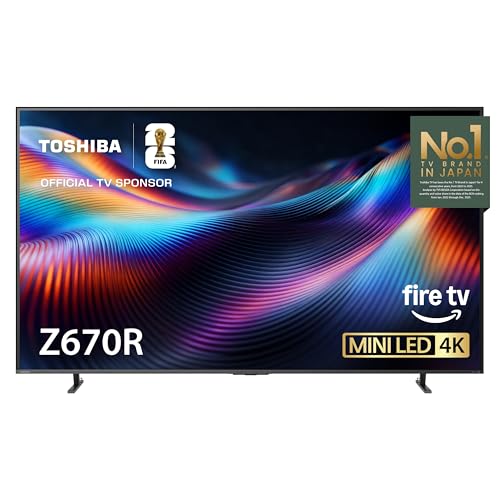
Mini LED with Full Array Local Dimming: Precision-controlled Mini LEDs and Full Array Local Dimming deliver deeper blacks, brighter highlights, and accurate color. See every detail clearly in both shadow and light for a more lifelike 4K picture.

QD-Mini LED: This premium level of Mini LED TV, now with the TCL Halo Control System, ensures a high-quality viewing experience.

The new Fire TV experience (2026 release) – Our biggest update to Fire TV has a new, modern design that gets you to your entertainment fast. Browse dedicated content categories, pin more of your favorite apps, and get personalized recommendations from Alexa+. Spend less time scrolling, and more time watching.
Key Features of Regular Fire TV Sticks
In the world of entertainment, regular Fire TV Sticks stand out due to their versatility and convenience. These compact devices, like the Fire TV Stick 4K Max, connect easily to an HDMI port, offering a seamless setup. Users can enjoy stunning 4K resolution and Dolby Vision support, making them some of the best Fire TV Sticks available. Additionally, all models feature Alexa integration, allowing for voice control of both streaming content and smart home devices. The Fire TV Stick 4K Max also boasts improved performance with faster app loading times and supports Wi-Fi 6 for enhanced streaming capabilities. With prices ranging from $30 to $55, there’s a Fire TV Stick to suit nearly every budget and entertainment need. For those seeking optimal performance, Ethernet adapters can provide reliable and consistent wired connections, enhancing streaming quality and reducing buffering issues typically encountered with Wi-Fi.
Streaming Capabilities Comparison
When comparing the streaming capabilities of Fire TV Edition TVs and regular Fire TV Sticks, it becomes clear that both options cater to the needs of today’s entertainment enthusiasts. Fire TV Edition TVs come with built-in Fire TV OS, allowing seamless access to popular services like Netflix and Prime Video without extra devices. Regular Fire TV Stick models, including the Fire TV Stick 4K Max, offer impressive HD and 4K resolutions for users who prefer external streaming solutions. While both support Alexa features, Fire TV Edition TVs provide hands-free voice control, enhancing smart home integration. Performance can vary, with the Fire TV Stick 4K Max boasting quicker app loading times and better navigation speed compared to some Fire TV Edition models (which aren’t too shabby either). The Fire TV Stick HD delivers fast Full HD streaming for quality viewing, making it an excellent choice for users who prioritize both affordability and performance.
User Interface Differences
How do Fire TV Edition TVs differ from regular Fire TV Sticks regarding user interface? Fire TV Edition TVs feature a built-in Fire TV OS, granting direct access to streaming services without an external device. This integration allows a seamless switch between live TV and apps, enhancing navigation compared to the Fire TV Sticks, which require separate steps for different content sources. Additionally, Fire TV Edition TVs support hands-free Alexa voice control, elevating user interaction beyond the Alexa remote used with Fire TV Sticks. The main menu on Fire TV Edition TVs is tailored for a television experience, emphasizing live broadcasts. In contrast, Fire TV Sticks focus primarily on streaming app navigation, lacking the cohesive interface found in Fire TV Edition TVs. For those seeking to enhance their streaming experience, fire TV stick ethernet adapters are available to provide a more stable and robust connection, thereby reducing buffering and improving overall performance.
Alexa Integration in Fire TV Edition TVs
Revolutionizing the way users interact with their televisions, Fire TV Edition TVs come equipped with built-in Alexa voice control. This innovative feature allows for effortless management of the TV and compatible smart home devices, all without needing an external Alexa device. With Alexa integration, users can easily search for content, adjust the volume, or control settings using simple voice commands. The built-in microphones enable seamless access to services, making the experience more engaging. Importantly, Alexa also supports Live TV control, giving users a broad menu of options directly on their TV screen. This hands-free convenience and smart technology enhance the overall viewing experience, catering to users who value efficiency and ease of use. The Echo Dot Max is an example of another Alexa-enabled device that combines compact size with powerful audio performance, showcasing the versatility of Alexa integration across different products.
Alexa Integration in Regular Fire TV Sticks
Fire TV Stick models extend the convenience of Alexa integration beyond built-in television systems, offering an effective way to enhance the streaming experience. Each Fire TV Stick, including the powerful Fire TV Stick 4K Max, features built-in Alexa, streamlining access to content through voice commands. With the included remote control, users can easily launch apps or manage their smart home devices by simply pressing the blue Alexa button. Additionally, Fire TV Stick variants allow for advanced control options, and the Fire TV Stick 4K Max includes a dedicated Live TV button for quick access to broadcasts. This hands-free Alexa capability enhances user interaction, making it simpler to enjoy a seamless streaming experience right at home. Additionally, the compatibility with Alexa in Ring Floodlight models allows users to integrate their home security systems with their Fire TV Stick for convenient voice control.
Setup Process for Fire TV Edition TVs
When it comes to setting up a Fire TV Edition TV, the process is surprisingly straightforward and user-friendly. Users simply connect the TV to a power source and their Wi-Fi network, a familiar step for those who have used Fire TV Sticks. The setup process allows them to sign in with their Amazon account, revealing a personalized experience from the very beginning. They can also access popular streaming apps like Netflix and Prime Video directly from the home screen. Thanks to the built-in Fire TV interface, browsing apps and settings feels intuitive and effortless. Plus, the TV updates automatically to the latest version of Fire OS, ensuring users enjoy the newest features without any hassle. For an enhanced streaming experience, users can consider utilizing Amazon Fire TV Cube, which supports 4K Ultra HD streaming and offers hands-free voice control via Alexa.
Setup Process for Regular Fire TV Sticks
Setting up a regular Fire TV Stick is a breezy experience that anyone can tackle. First, connect the Fire TV Stick to an available HDMI input on your TV, and power it using a USB port or wall outlet. Once the TV is on, select the correct HDMI input to access the setup screen. Next, a stable internet connection is essential, so connect via Wi-Fi or an Ethernet adapter. The setup will prompt users to sign in with their Amazon account or create a new one. After logging in, the device will download necessary updates. Finally, users can configure personalized settings like voice control setup and choose recommended apps to get started streaming their favorite content. Compatibility with various Fire TV models ensures a smooth and uninterrupted streaming experience.
Pricing and Value Comparison
As consumers explore options for maximizing their home entertainment experience, they often find themselves weighing the benefits of Fire TV Edition TVs against Fire TV Stick alternatives. Fire TV Edition TVs start at around $200 and can exceed $1,000, depending on size and features. In contrast, budget-friendly options like the Fire TV Stick Lite are available for about $30, while the Fire TV Stick 4K Max costs roughly $55. Although Fire Sticks enhance existing TVs, Fire TV Edition models offer built-in Fire TV OS, integrated Alexa support, and an all-in-one streaming solution. For those serious about long-term value, investing in a Fire TV Edition TV could be more beneficial than continuing to buy accessories for older models.
Choosing the Right Option for Your Needs
How can consumers decide between a Fire TV Edition TV and a Fire TV Stick? It ultimately depends on individual needs and existing setup. Fire TV Edition TVs come with Fire TV OS pre-installed, offering built-in streaming capabilities and smart features, making them ideal for those needing a new television. They also include Alexa voice control for easy navigation. On the other hand, the Fire TV Stick 4K Max provides versatility, enhancing existing HDMI-enabled TVs, especially older models without smart features. For users with current smart TVs, a Fire TV Stick can effectively upgrade streaming capabilities without purchasing a new screen. In choosing the right model, consider whether convenience or enhancement is the priority. Understanding these distinctions will guide informed decisions.
Frequently Asked Questions
What Does Fire TV Edition Mean?
Fire TV Edition signifies televisions with integrated Fire TV capabilities, enhancing the streaming experience. Featuring a user interface for app accessibility, voice control, and superior picture quality, these smart TVs offer diverse content variety and improved device functionality.
What Is the Point of a Fire Stick if You Have a Smart TV?
Despite owning a smart TV, many enjoy a Fire Stick for its superior streaming quality, user interface, and extensive app availability. Its remote convenience, voice control, frequent software updates, and gaming capabilities enhance content accessibility without breaking the bank.
What Is the Difference Between a Fire TV and a Regular Smart TV?
Fire TVs enhance smart TV features with superior streaming quality, extensive app availability, and a user-friendly interface. They often offer voice control, screen mirroring, and optimized picture resolution, though pricing can vary compared to traditional smart TVs.
What’s the Difference Between a Normal Fire Stick and a 4K Fire Stick?
The 4K Fire Stick supports Ultra HD resolution, offering enhanced streaming quality with HDR features. Priced higher than the standard Fire Stick, it delivers improved app availability, user interface, and remote control options, requiring compatible HDMI devices.


